Beatlab - let's get
started making music...23rd November 2012
Create
tracks and loops on the web.
Welcome to beatlab! This wiki
contains tips and tricks, tutorials, and frequently
asked questions. It is community organized, so if
you think something is missing or is incorrect, feel
free to edit.
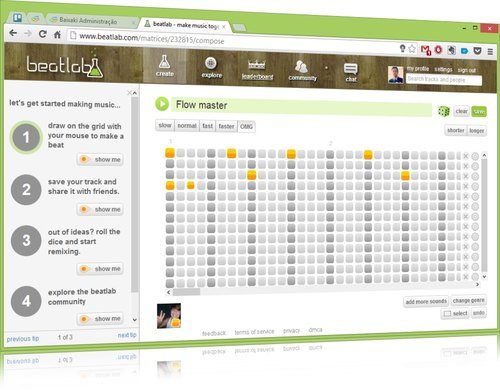
Beats are composed on the grid in
the create section of beatlab. Each row on the grid
corresponds to a different sound. Each column on the
grid corresponds to a different point in time.
Clicking on a square will light it up. When you
press play, the grid will start playing the squares
that you have selected.
If you don't like the sounds on the
grid, you can add more sounds using the "add more
sounds" button below the grid. You can also click
the "change genre" button to change all the sounds
at once.